Skip to content

What it does, module by module.

AviSMS is a web application with 11 modules that together cover the management system ORO.GEN.200 and ORA.GEN.200 describe: reporting, risk, action, change, audit, documentation, promotion and the settings that hold the organisation's accountability. It runs in the browser and stores everything under one organisation in the EU.

ORO.GEN.200(a)(3)

Dashboard

The safety manager's morning view: what is open, what is overdue, and how the indicators are trending.

  • Safety Performance Indicators with targets and alert levels, defined per organisation in Settings.
  • Monthly occurrence chart and category breakdown for the current period.
  • Open occurrences, reports inside and past the 72-hour window, Article 13 analysis dates falling due, findings by deadline, actions due and overdue, training expiring within 60 days.
  • Organisation-wide figures are computed server-side, so every member sees the same numbers.
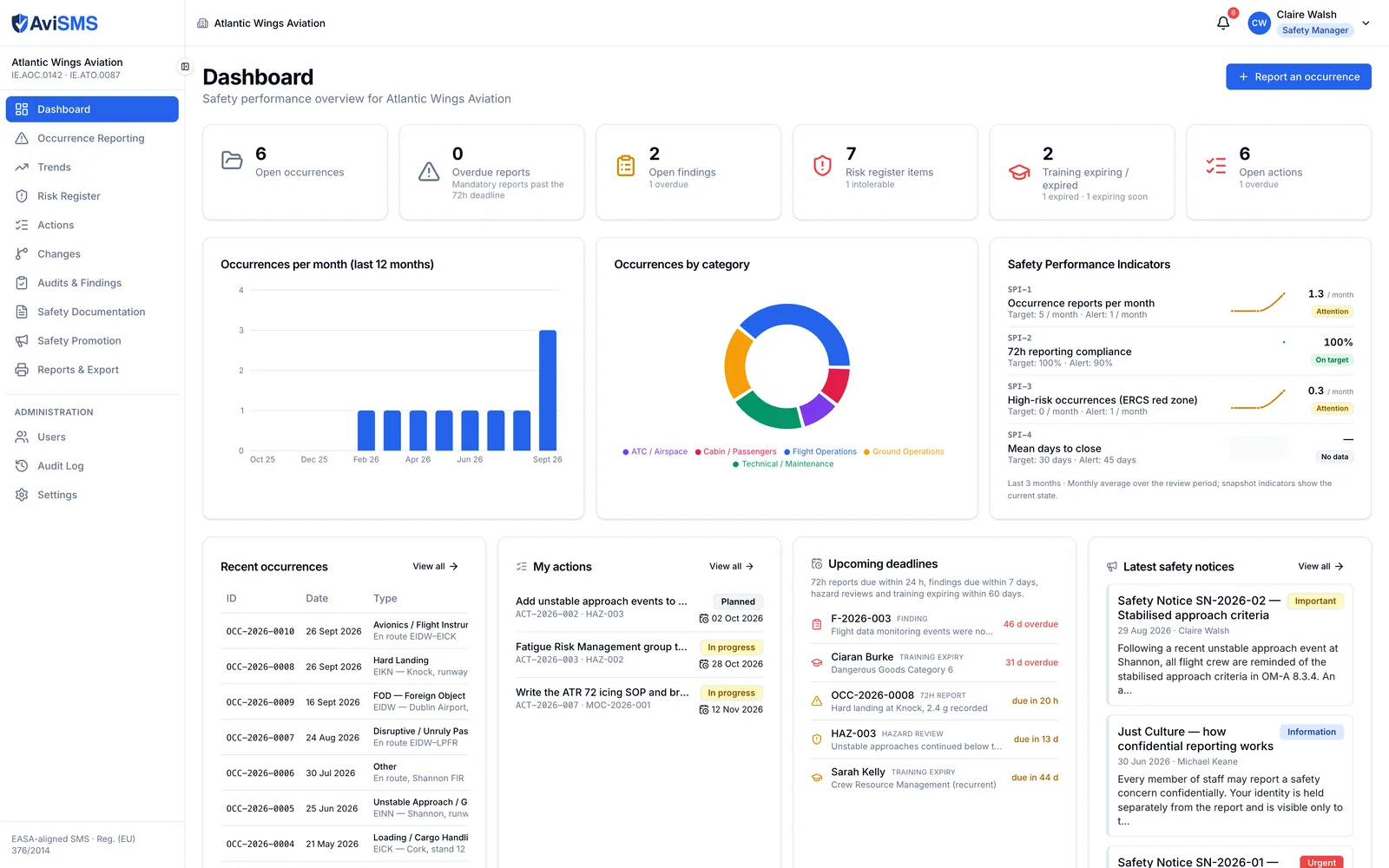
Dashboard of a demonstration operator: six counters across the top, the occurrences-per-month and category charts, and the Safety Performance Indicators with targets and alert states.
The AviSMS dashboard: Safety Performance Indicators with their targets and alert levels, the monthly and category charts, and what is open across the organisation.

Reg. (EU) No 376/2014, Art. 4, 7, 13, 16

Occurrence reporting

From the first report to closure, with the authority's format and the authority's clocks.

  • ECCAIRS-aligned form: headline, UTC and local date and time, state and location of occurrence, occurrence class and category, aircraft registration and category, phase of flight, injury and damage levels, weather relevance, dangerous goods.
  • The aircraft is picked from your fleet register, which fills the ECCAIRS aircraft block — ADREP category, mass group, propulsion — from the aircraft's own record. Free text stays for another operator's aircraft.
  • One button fetches the METAR: the observation closest before the occurrence time, from the NOAA aviation weather service within 30 days and the Iowa Mesonet archive for anything older. The raw report and its source are kept with the parsed wind, visibility, cloud base, temperature and QNH, and nothing is written until you confirm it.
  • ERCS classification: severity class A–E of the most probable accident outcome within a key risk area, and a barrier-by-barrier assessment that produces the score.
  • 72-hour authority-reporting countdown from when the organisation becomes aware; amber 24 hours before the deadline; stops at the first filing to the authority.
  • Article 13(4) clocks: filing starts the preliminary analysis deadline at 30 days and the final at 90, both configurable. Filing a preliminary or final version stops the matching clock; recording that the analysis found no safety risk suspends both.
  • Authority submission log: every filing to the competent authority with its channel, version — initial, preliminary, final or update — the ECCAIRS reference the portal returned and the file that was sent.
  • Investigation on the same record: Five Whys, root cause, contributing factors, and corrective and preventive actions that become tracked actions with an assignee and a due date.
  • Risk assessment tab: the per-case assessment the 30-day analysis needs, signed by the assessor and the safety manager.
  • A closing gate on mandatory occurrences: a graded ERCS or a completed risk assessment, at least one action or a written justification for taking none, and a follow-up filing where the occurrence was reported.
  • Suggested risks and mitigations from a library keyed on the occurrence category, applied to the risk register in one step.
  • Forwarding to named colleagues, feedback to the reporter, and broadcast to the whole organisation.
  • Confidential (Just Culture) reports: the reporter's identity is stored in a restricted sub-record.
  • Attachments up to 25 MB each; sequential references (OCC-2026-0001); a full history of every change.
  • Exports: the E5X package for ECCAIRS 2 — a zip of one XML per occurrence with its attachments, which is what the portal's importer expects — the ECCAIRS form as PDF, and the occurrence report as PDF.
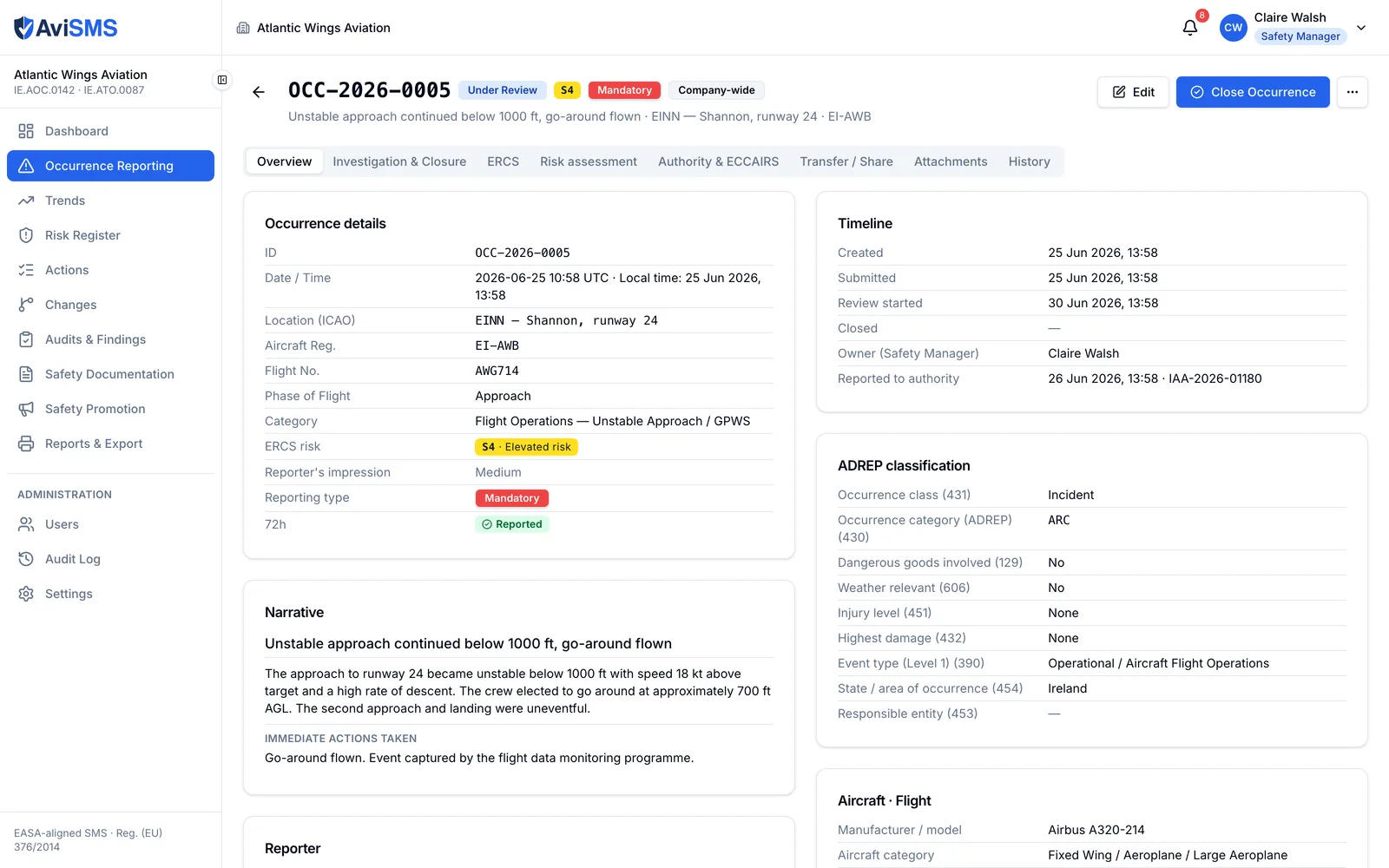
An occurrence record showing occurrence details with its ERCS risk score, its ADREP classification block, the narrative, the reporter with their post, and a timeline including the report to the authority and its reference.
One occurrence under review: the ADREP classification the authority reads, the ERCS risk score, the 72-hour state, and the filing that stopped the clock.

Reg. (EU) No 376/2014, Art. 13

Trends

The analysis the regulation asks for, over any period.

  • Breakdowns by category, severity, occurrence type, phase of flight and location.
  • 72-hour compliance: reported in time against reported late.
  • Open against closed, and the distribution of risk scores across the register.
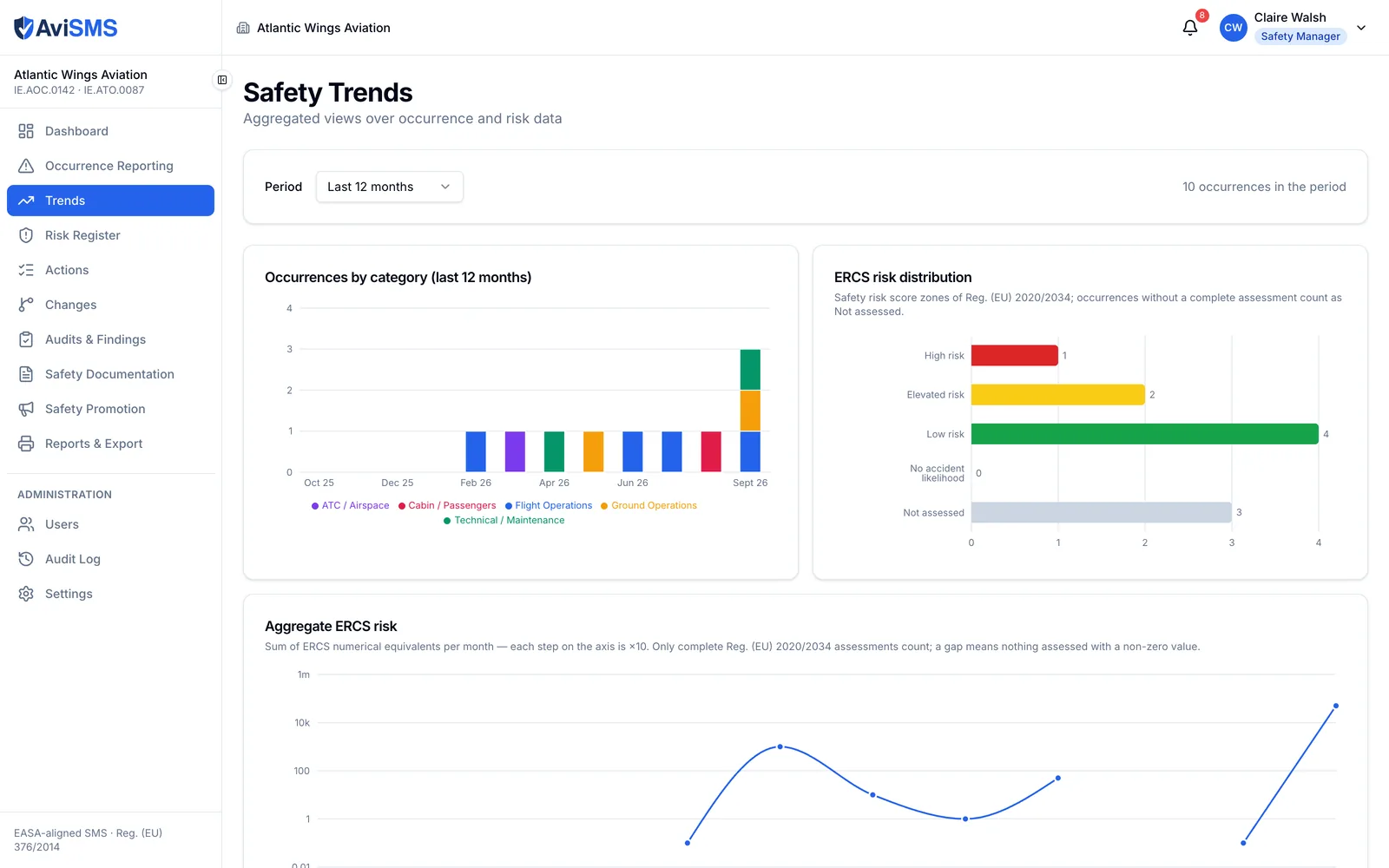
The trends page over the last twelve months: occurrences by category per month, the ERCS risk zones, the monthly aggregate ERCS risk on a logarithmic scale, and the most frequent occurrence types and phases of flight.
Twelve months at a glance: categories month by month, the ERCS risk zones and the aggregate ERCS risk, and the occurrence types and phases of flight that keep coming back.

ORO.GEN.200(a)(3)

Risk register

Hazards, their assessment, the actions that control them and what is left after them.

  • 5×5 matrix, likelihood against severity, score = likelihood × severity; tolerability thresholds default to 8 (tolerable with mitigation) and 15 (intolerable) and are configurable.
  • The wording is yours: each severity and likelihood level carries its own label, its letter or number code and an optional rate, so the register and the PDFs print the scale your manual uses — MINOR (B), EXTREMELY IMPROBABLE (1). The arithmetic stays 5×5.
  • Intolerable risks are flagged for escalation to the Accountable Manager.
  • Mitigations are actions in the tracker, with an assignee, a due date and verification, not a line of text; residual likelihood and severity are recorded after them.
  • Per-case risk assessments (RA-2026-001): the event described once, then a row per hazard with the risk before and after and the consequences of leaving it unmanaged, the action items, a conclusion, and sign-off by the assessor and the safety manager. Exported as a PDF in the layout your authority already reads.
  • Links between hazards and the occurrences and changes that raised them; hazards due for review are picked up by the daily check.
  • A mitigation library the organisation extends, overrides or hides, with CSV import and export.
  • Sequential references (HAZ-001) and a full history.
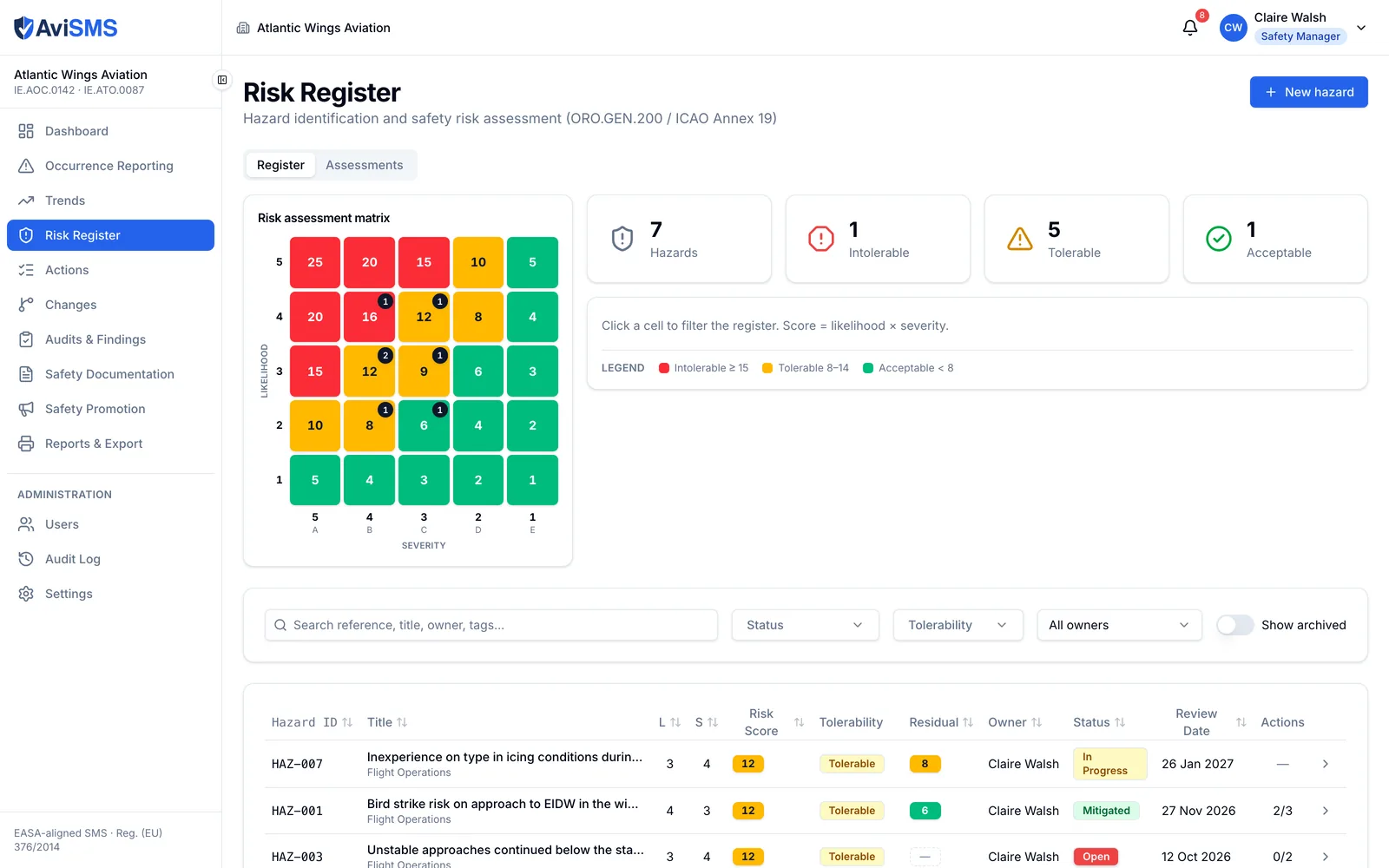
The risk register with the 5x5 matrix beside four counters, and the hazard table beginning immediately below it.
The register: the matrix is a filter, not the page. Click a cell and the table below narrows to it.

ORO.GEN.200(a)(3)

Action tracker

One list of everything the organisation has undertaken to do, owned by named people.

  • Every mitigation, corrective and preventive action is one record (ACT-2026-001), whatever raised it: a hazard, an occurrence, a finding, a risk assessment or a change.
  • Assignee with their position, due date, and status planned → in progress → done → verified, with who completed and who verified it, a closure note and evidence attachments.
  • Routing by area: Settings map each functional area to a position, so a flight-operations action is pre-filled to the Flight Operations Manager, continuing airworthiness to the CMM, training to the Head of Training. Always overridable.
  • The assignee progresses their own actions and attaches the evidence; verification stays with the safety manager and administrators.
  • Every role gets the actions assigned to them, including reporters — a pilot sees and closes their own without seeing anyone else's report.
  • Notifications on assignment, 7 days before the due date, and every morning once overdue.
  • Hazards and findings carry a done-against-total summary kept up to date server-side, so nothing is closed with an open action behind it.
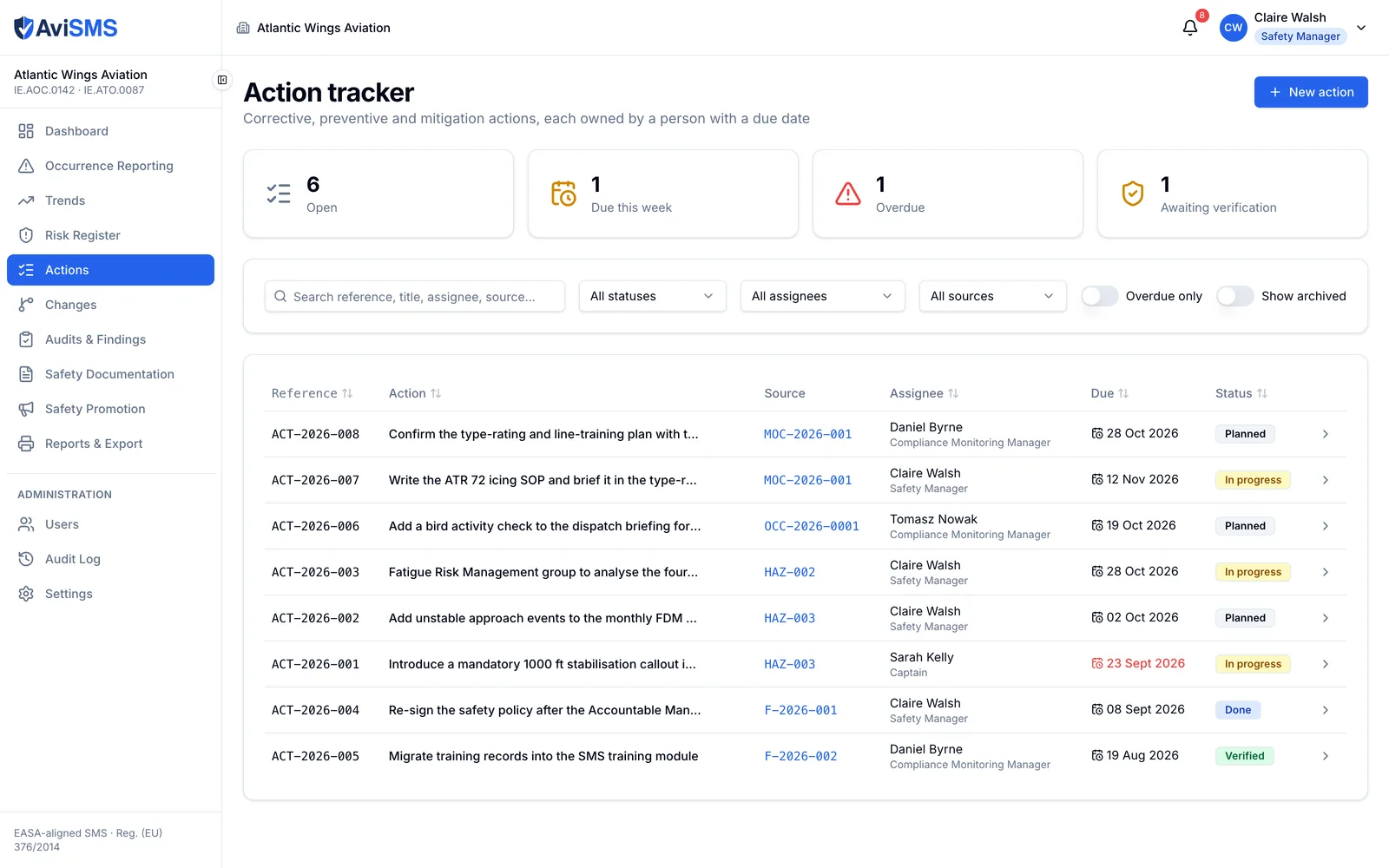
The action tracker listing actions with references, their source record, the assignee and their position, due dates and statuses, with one overdue date in red.
Every action in one list, whatever raised it — each row carries the source, the owner and their post, the due date and the status.

ORO.GEN.200(a)(3), ICAO Annex 19 (safety assurance)

Management of change

A change assessed before it happens, and reviewed after it has.

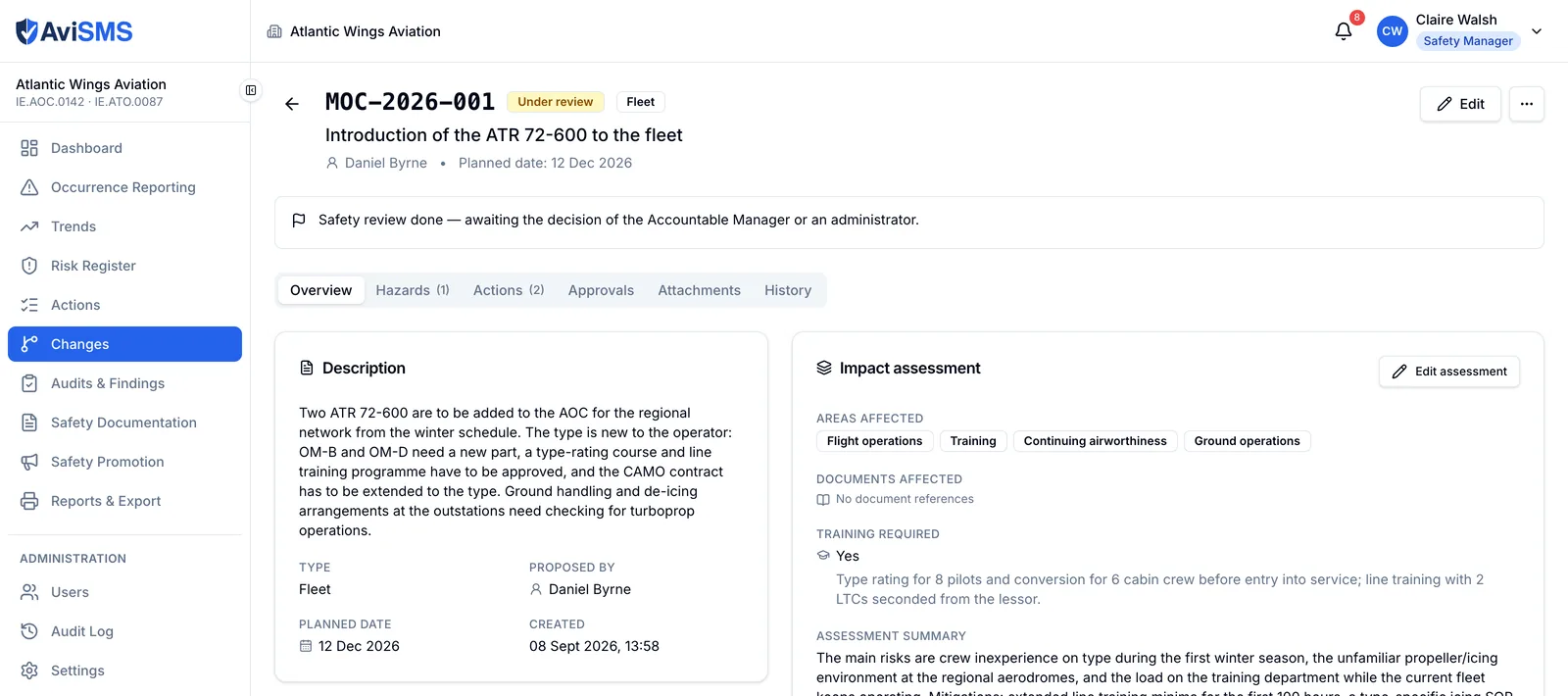
  • Change records (MOC-2026-001) for a change of organisation, fleet or aircraft type, route or destination, procedure or manual revision, key post, system, or outsourcing.
  • Safety assessment: the areas affected, the documents it touches, the training it needs, the hazards it raises — assessed on the same 5×5 matrix — and the actions that carry it out.
  • Status proposed → assessed → approved or rejected → implementing → implemented → reviewed, with a post-implementation review date the daily check chases.
  • Approval is restricted to an administrator or the person holding the Accountable Manager post, and that restriction is in the security rules, not only on the screen.
  • Change record PDF, and a full history of every step.
A management-of-change record for introducing a new aircraft type, showing its description, impact assessment, affected areas, training required and assessment summary.
A change under assessment, waiting on the Accountable Manager: what it affects, the documents it touches, the training it needs, and the hazards and actions attached to it.

ORO.GEN.200(a)(6)

Audits and findings

Compliance monitoring with checklists, evidence and findings that have deadlines.

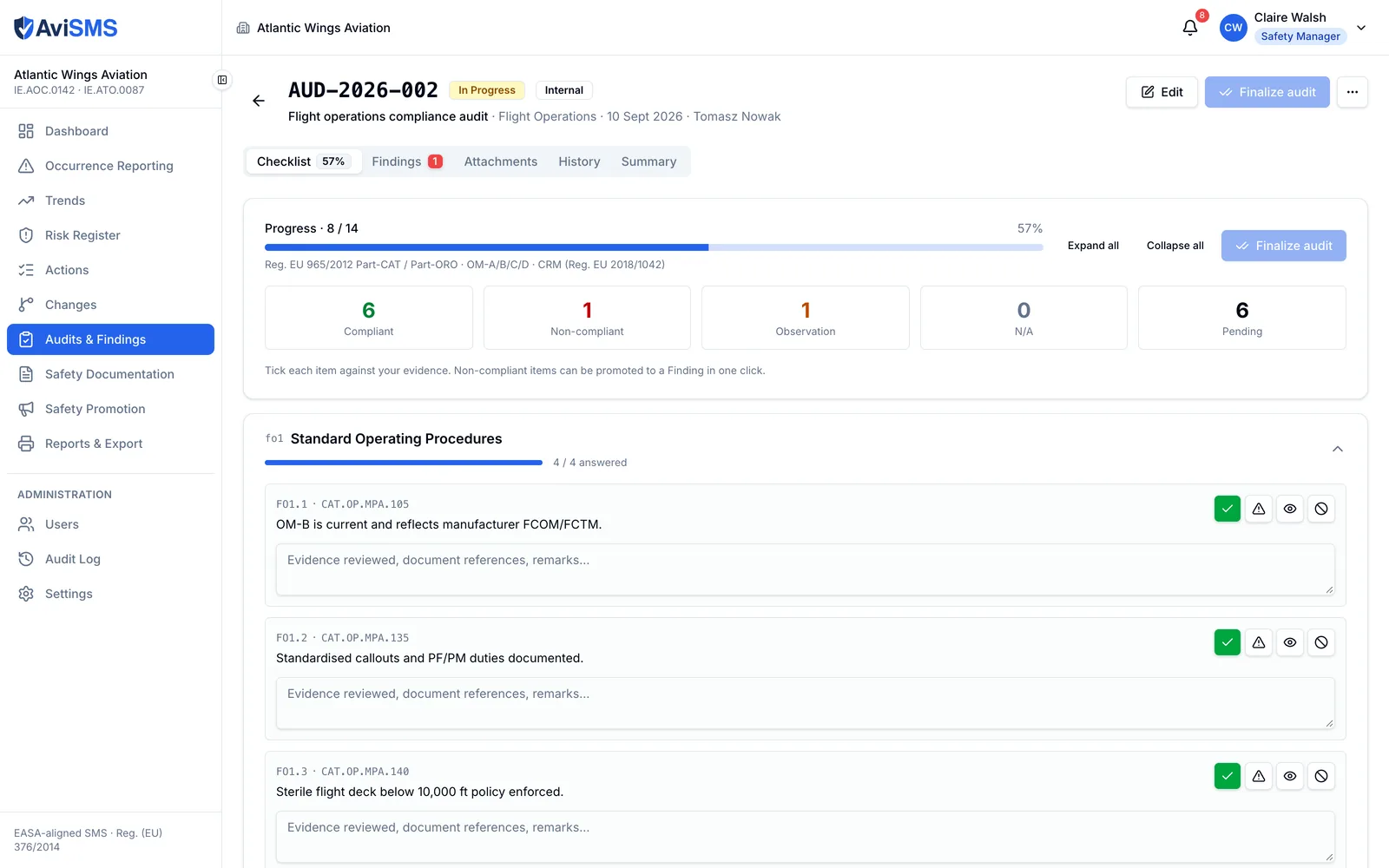
  • 30 checklist templates: 7 aligned with EASA requirements and 23 following the Operations Manual structure.
  • Four-state answers per item — compliant, non-compliant, not applicable, observation — with evidence and attachments.
  • Findings classified as Level 1, Level 2 or observation, with deadlines defaulting to 30, 90 and 180 days and configurable per organisation.
  • A finding points at the manual it is against: the document and the section reference, from the document register.
  • Corrective actions are tracked actions, so the finding cannot be closed while one is open; extensions carry a reason and verification precedes closure.
  • Sequential references (AUD-2026-001, F-2026-001) and a full history.
An audit in progress: the checklist at 57 per cent with counts of compliant, non-compliant, observation, not applicable and pending items, and the first items with their regulatory references and answer buttons.
A flight operations audit under way. Each item carries its regulatory reference, four possible answers and the evidence, and a non-compliant item becomes a finding in one click.

ORO.GEN.200(a)(2), (a)(5)

Safety documentation

The register of controlled documents the management system is made of.

  • 12 categories: Operations Manual Parts A to D, the SMS manual, the compliance monitoring manual, the emergency response plan, the safety policy, the training manual, the MOE and the CAME, and other.
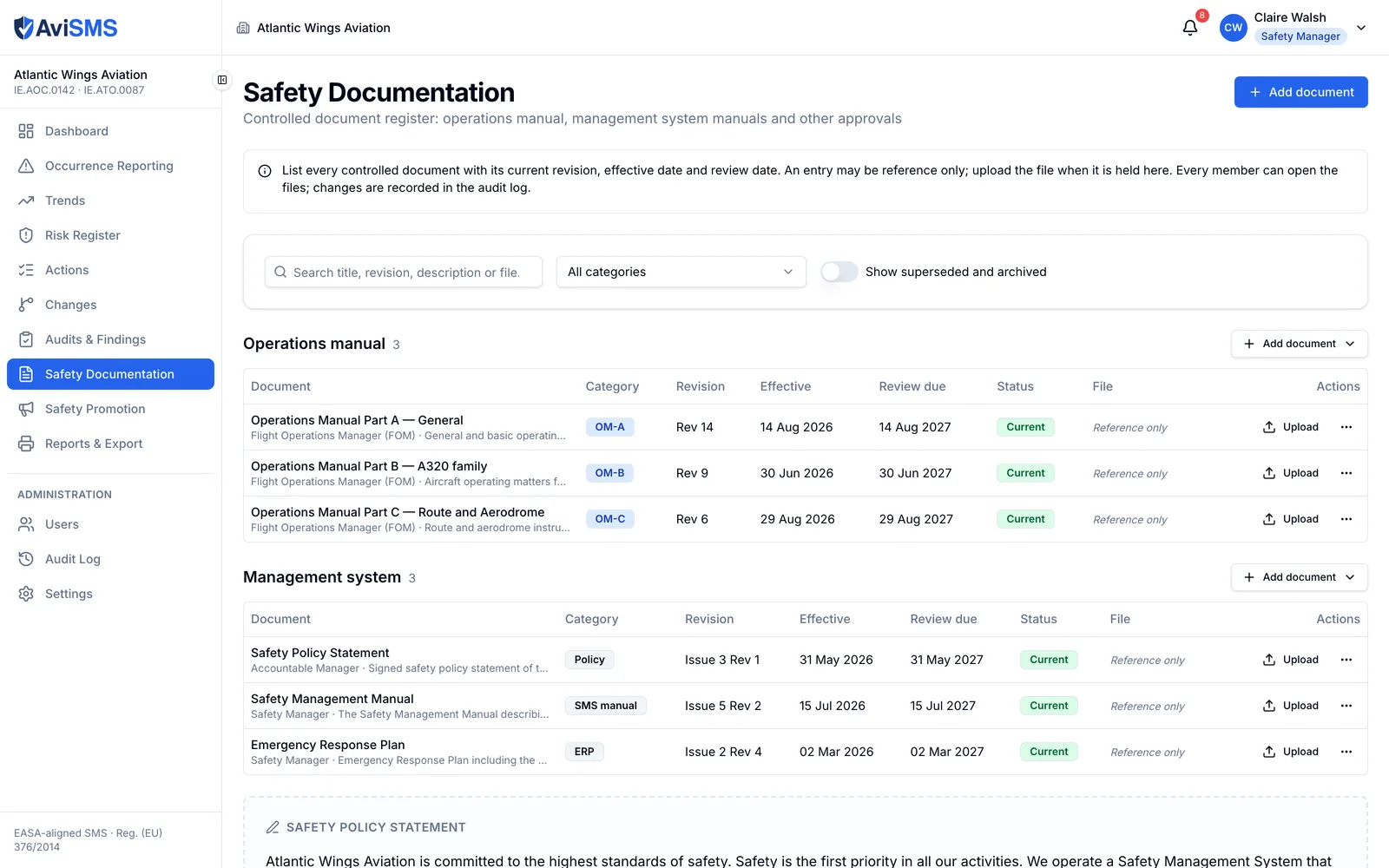
  • A document can be a reference-only entry — revision, effective date, owner, next review — with no file at all, so a 500-page Operations Manual does not have to be uploaded to be registered.
  • Findings, hazards and change records link to a document and the section inside it, so an auditor's question about which procedure applies has an answer on the record.
  • Revisions with effective dates and a draft, current or superseded status; files up to 25 MB.
  • The safety policy statement, signed by the Accountable Manager, shown to every member.
The controlled document register, grouped into the operations manual and the management system manuals, each entry with its category, revision, effective date, review date and status.
The register, grouped the way the management system is: each entry has its revision, effective date, review date and status, and a manual can be registered without its file.

ORO.GEN.200(a)(4)

Safety promotion

Communication and training, with proof that both reached the people they were for.

  • Safety notices addressed to positions or roles — flight crew and dispatch only, or everyone — with light formatting in the body.
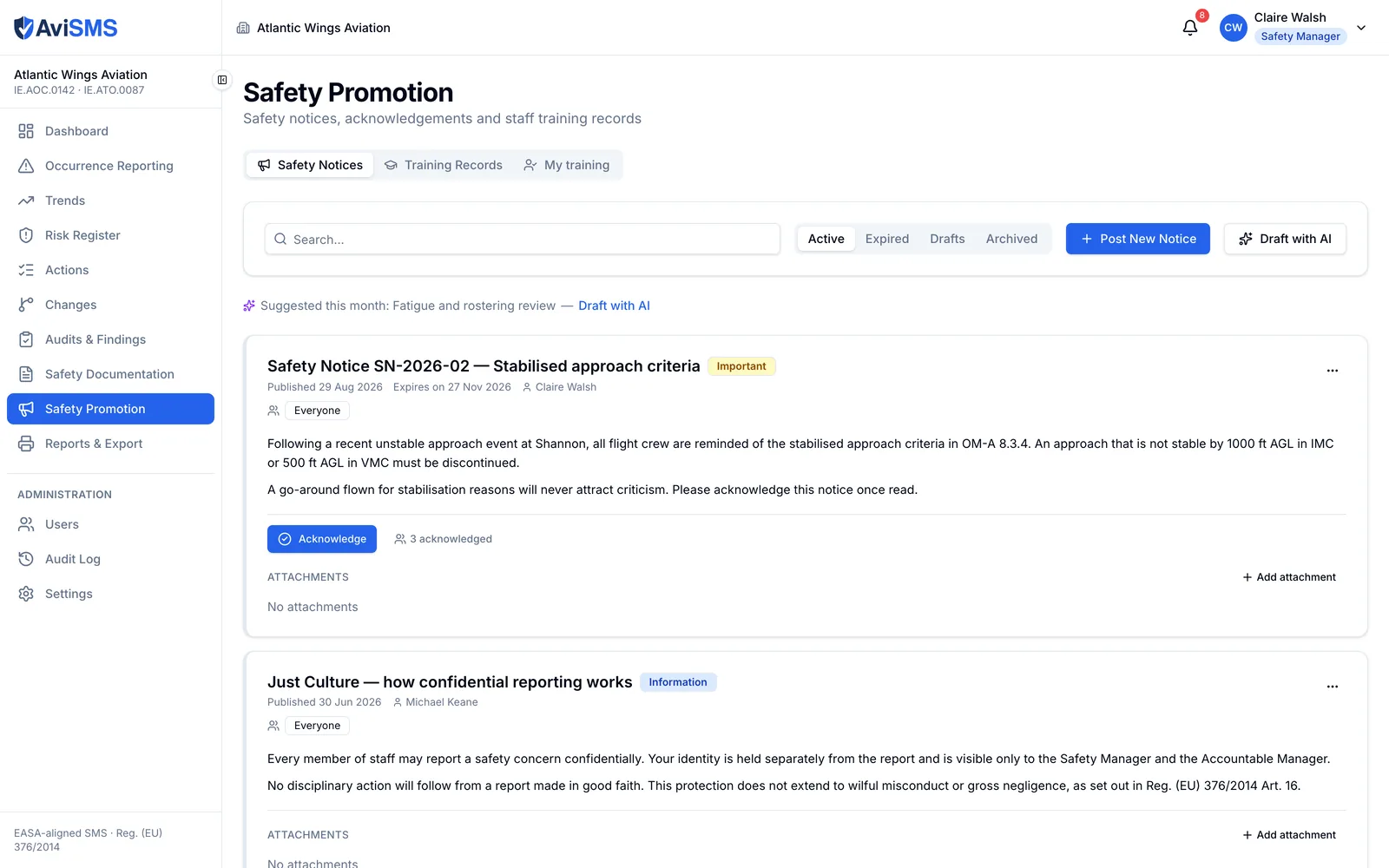
  • Publishing notifies the audience; acknowledgement is recorded per person; whoever has not acknowledged is reminded after 7 days. The read rate is visible by position.
  • Training records per person with expiry dates, a 60-day warning and a daily check for lapses.
  • Two-step sign-off on a training record: the trainee attests from their own view and can attach their certificate, then the Head of Training or a manager confirms. Recorded → attested → confirmed, both signatures kept on the record.
The safety notices list: a published notice on stabilised approach criteria with its audience, an Acknowledge button and the number of people who have acknowledged it, above a second notice on Just Culture.
A notice addressed to everyone, with the count of people who have acknowledged it. The month's promotion topic is suggested above the list.

Reports and export

Everything the authority or the Accountable Manager asks for, as a file.

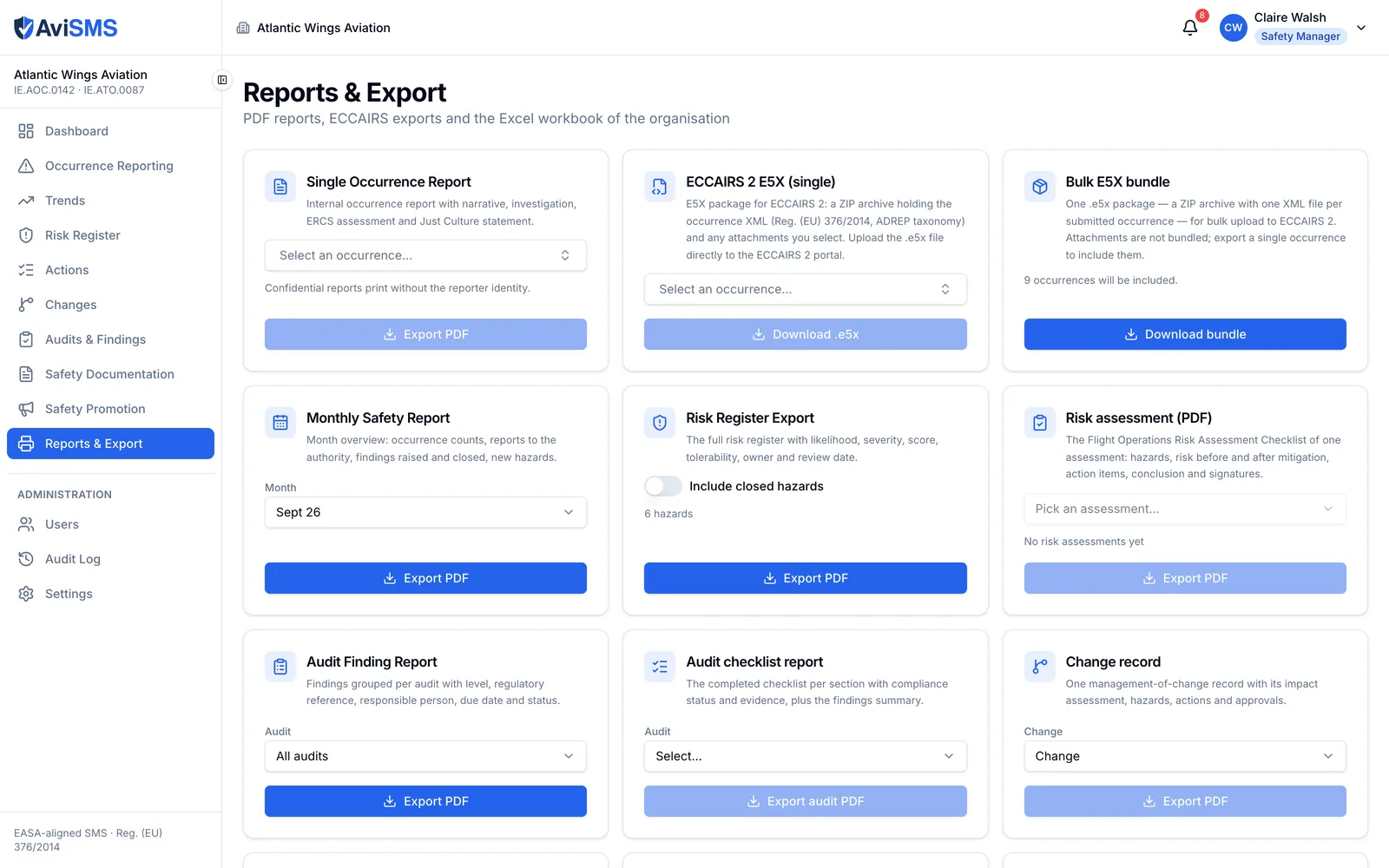
  • PDF: occurrence report, ECCAIRS form, risk assessment, change record, monthly safety report, risk register, audit findings, audit checklist.
  • Excel workbook with occurrences, hazards, audits and findings on separate sheets.
  • E5X for ECCAIRS 2, one occurrence or a bundle of them.
  • Blank and pre-filled forms as fillable PDFs, in your own layout and branding.
  • An Operations Manual section describing the safety management system as configured, as a Word-compatible file ready to paste into the manual.
The reports and export page: one panel each for the occurrence report, the single and bulk E5X export, the monthly safety report, the risk register, the risk assessment, audit findings, the audit checklist and the change record.
Every export on one page, each one generated from the live records when you press the button.

ORO.GEN.200(a)(1)

Settings

The organisation's accountability, people, fleet and thresholds.

  • Organisation profile: name, AOC and ATO numbers, competent authority, Accountable Manager, Safety Manager, logo — and a dated history of Accountable Manager changes, with the reason.
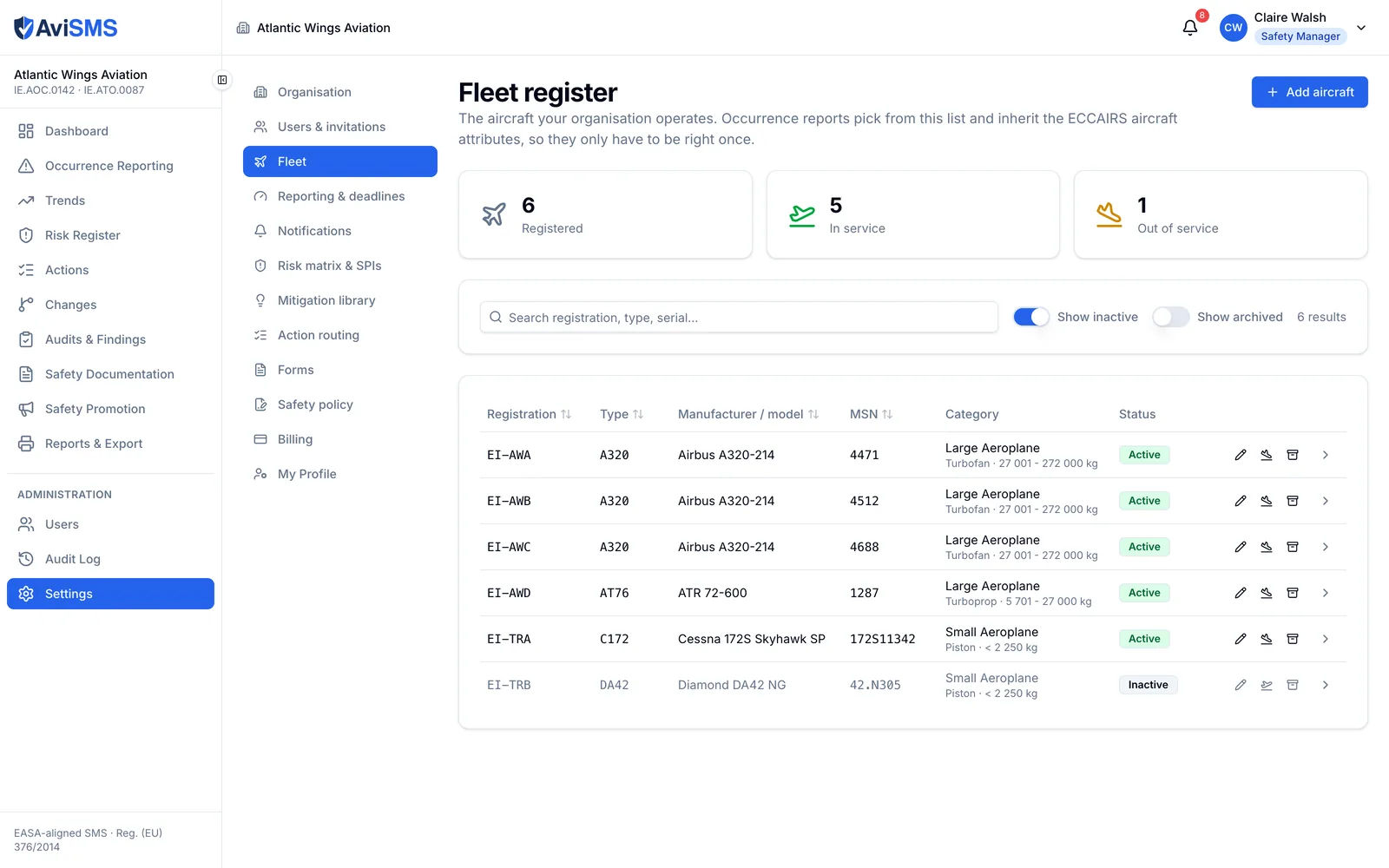
  • Fleet register: registration, ICAO type designator, manufacturer and model, serial number, ADREP category, mass group and propulsion. It is what the occurrence form fills the aircraft block from.
  • Users and invitations: invite by email, links valid for 7 days; deactivate and reactivate; change roles; record each person's post.
  • Action routing: which position an action in each functional area goes to by default.
  • Mitigation library and forms library, both the organisation's own.
  • Reporting deadlines (72 hours, the Article 13 30 and 90 days, finding deadlines, the training warning), risk thresholds and matrix wording, SPI definitions, safety policy text.
  • Data management: exports and a reset of demonstration data.
  • An audit log of every write, readable by administrators, written only by server-side functions.
The fleet register in Settings: six aircraft with registration, ICAO type designator, manufacturer and model, serial number, ADREP category with propulsion and mass group, and status.
The fleet register: type designator, ADREP category, propulsion and mass group are held once per aircraft, and every occurrence form fills its aircraft block from here.

Roles, and the posts beside them

A user belongs to exactly one organisation. Their role travels on the sign-in token as a claim set only by a server-side function, and the security rules enforce it on every read and write — the browser is never trusted.

Roles, and the posts beside them
RoleWhat they can do
AdministratorEverything, including users, invitations and settings.
Safety managerOccurrences (investigate, classify, close), risk register, actions, changes, audits, documents, promotion, reports; settings read-only.
AuditorAudits and findings in full; creates and updates actions but does not verify them; read access to everything else; no users or settings.
ReporterFiles reports; sees their own, broadcast and forwarded occurrences; reads documents and notices; sees and closes the actions assigned to them.
ViewerRead-only across the organisation; no users or settings.

A person also has a post: one of the nominated management posts — Safety Manager, Compliance Monitoring Manager, Accountable Manager, Flight Operations Manager, CMM, Head of Training, Dangerous Goods Manager, Security Manager, CAMO Manager — or a crew and staff post such as Captain, First Officer, Cabin Crew, Flight Instructor, Student Pilot, Dispatcher, Engineer or Ground Operations. The role decides access. The post decides routing: who is notified when a report arrives, who is pre-filled as the owner of an action, who confirms a training record, and who may approve a change. Nothing branches permissions on a post.

Every export

Each one is generated from the organisation's live data, with the organisation's name and logo.

Every export
WhatFormatNotes
Occurrence reportPDFFull record including ERCS, investigation, submissions and history.
ECCAIRS formPDFThe occurrence laid out as the ECCAIRS reporting form.
E5X packageE5X (zip)ECCAIRS 2 exchange format: one XML per occurrence in the ADREP taxonomy, with attachments, versioned so a follow-up matches the original report.
Risk assessmentPDFThe per-case assessment: hazards, risk before and after, actions, conclusion and both signatures.
Change recordPDFThe change, its safety assessment, approvals and post-implementation review.
Monthly safety reportPDFOccurrences, trends and open items for a month.
Risk registerPDF, ExcelHazards, assessments, mitigating actions, residual risk.
Audit findingsPDF, ExcelFindings with levels, deadlines and status.
Audit checklistPDFA completed checklist with answers and evidence.
Organisation workbookExcelOccurrences, hazards, audits and findings on separate sheets.
FormsFillable PDFBlank for the crew room, or pre-filled from a record.
Operations Manual sectionWord-compatibleThe SMS as configured, in manual-ready prose.

What is not built

Said plainly, so nobody finds out during an audit.

  • No native mobile app. The web application is responsive and works on a phone, but there is no App Store or Play Store listing.
  • No direct transmission to ECCAIRS 2. AviSMS produces the E5X package and the PDF; you upload them through your competent authority's reporting portal. The machine-to-machine E2 API is not integrated — access to it is granted organisation by organisation, and we will say so before we claim otherwise.
  • No flight data monitoring. Occurrences are reported by people, not derived from recorded flight data.
  • No public API. Data leaves through the exports above.
  • Word files are not read directly. A company form is uploaded as a PDF or an image; export it from Word first.
  • The AI assistant drafts, and only drafts. It classifies nothing, closes nothing and files nothing with an authority; every draft waits for a person to accept it.

See it with your own organisation.

Create your organisation at app.avisms.aero and you are its first administrator. Everything above is switched on.