The SMS your auditor will recognise.
AviSMS runs occurrence reporting, the risk register, the actions that come out of it, management of change, audits and findings, controlled documents and safety promotion for AOC holders and approved training organisations — structured the way Regulation (EU) No 376/2014, ORO.GEN.200 and ICAO Annex 19 describe a management system.
With the optional AI assistant, the first draft of an investigation, a set of mitigation measures or a safety bulletin is one button away — and a named person accepts or rejects every line of it. How the AI assistant works
Nothing to install. Hosted in the EU. One organisation, one boundary.
Built on the regulations, not around them.
Four texts define what a safety management system in the EASA system has to do. Each one has a home in AviSMS, in the regulation's own vocabulary.
Reg. (EU) No 376/2014
Occurrence reporting, analysis and follow-up
What it requires. Mandatory occurrences reach the competent authority within 72 hours, in an ECCAIRS-compatible format. The preliminary results of the analysis follow within 30 days and the final results in principle within three months. Reporters are protected by Just Culture.
Where it lives in AviSMS. A 72-hour clock on every occurrence and the Article 13 clocks after it, a log of every filing to the authority, confidential reports whose reporter identity is stored apart from the report, an investigation record, and the E5X package in the ECCAIRS 2 format.
ORO.GEN.200
The AOC holder's management system (Reg. (EU) No 965/2012)
What it requires. Lines of accountability, a safety policy, hazard identification and risk management, trained personnel, documented processes and a compliance monitoring function — proportionate to the size of the operator.
Where it lives in AviSMS. Each of the six components has a module: the organisation profile and Accountable Manager history, the signed policy, the risk register, training records, controlled documents, audits and findings.
ORA.GEN.200
The same management system for ATOs (Reg. (EU) No 1178/2011)
What it requires. Approved training organisations run a management system with the same components as an operator's, scaled to a flight school.
Where it lives in AviSMS. One product serves an AOC, an ATO, or an organisation that holds both certificates.
ICAO Annex 19
Safety management and the Doc 9859 risk matrix
What it requires. Safety policy and objectives, safety risk management, safety assurance — which includes the management of change — and safety promotion, with a likelihood-against-severity matrix for risk assessment.
Where it lives in AviSMS. The four components map onto the modules, management of change included: a change is assessed on the same matrix before it happens and reviewed after it has. The 5×5 matrix, its tolerability thresholds, its wording and the Safety Performance Indicators are configured per organisation.
One occurrence, start to finish.
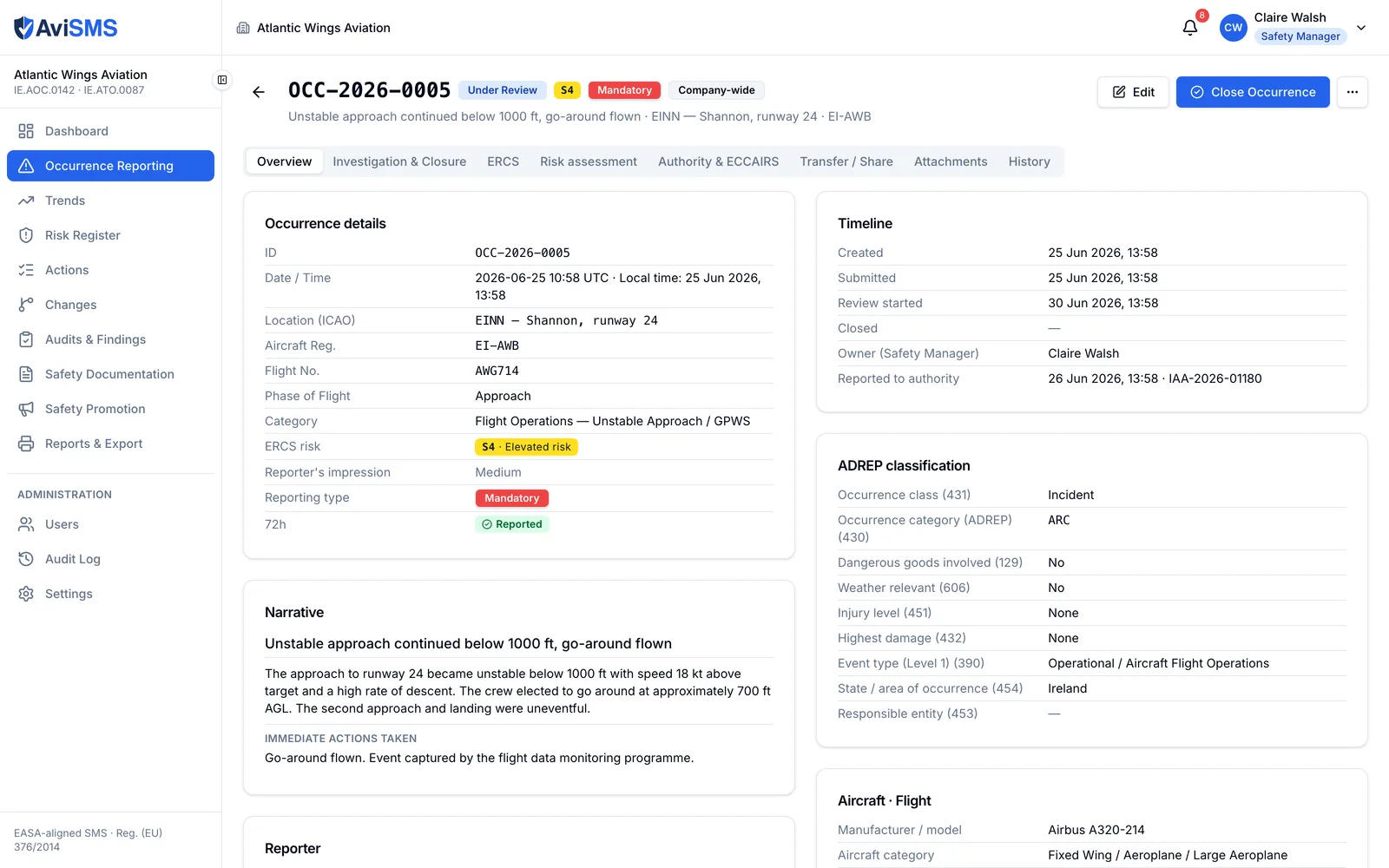
The states below are the ones the application enforces, in the order it enforces them. Every step is written to the occurrence's history by a server-side trigger, so the record of who did what cannot be edited from the browser.
Reported
Anyone with an account files it
A pilot, engineer or cabin crew member fills in the ECCAIRS-aligned form from any browser. The report receives a sequential reference such as OCC-2026-0031, and the reporting clock starts from the time of the occurrence, not the time of filing.
Authority report
72 hours, counted down
The countdown turns amber 24 hours before the deadline, and a daily check notifies the safety manager about anything overdue. The filing is recorded with its channel, its version and the reference the portal gave back, and that entry stops the clock. The E5X package for ECCAIRS 2 is one click away.
Classified
ERCS severity and barriers
The safety manager picks the key risk area and the potential loss of life, which give the severity, then the barrier that stopped the occurrence and how the ones after it fared. The occurrence carries the European Risk Classification Scheme score the authority itself uses, such as S4, in its red, yellow or green zone.
Analysed
30 days, then three months
Filing starts the Article 13(4) clocks: the preliminary results and the action to be taken are due in 30 days, the final results in 90. The risk assessment tab produces the signed per-case record those deadlines are about, and filing a preliminary or final version stops the matching clock.
Investigated
Five Whys, root cause, corrective actions
The investigation lives on the occurrence: Five Whys, root cause, contributing factors, feedback to the reporter and forwarding to the colleagues who need to act. Every corrective and preventive action becomes a tracked action with a named owner and a due date, not a line of text.
On the register
Hazards, mitigations, residual risk
Hazards raised from the occurrence land on the 5×5 risk register with mitigations, owners and residual risk, and stay linked back to the report that raised them.
Closed
Only through the gate
A mandatory occurrence closes when it has a graded ERCS or a completed risk assessment, at least one action or a written justification for taking none, and a follow-up filing if it was reported. Then it stays in the register, archived and never deleted, for the monthly report, the trend analysis and the next audit.
11 modules, one organisation.
Every write in every module is recorded in an audit log that only server-side functions can append to.
ORO.GEN.200(a)(3)
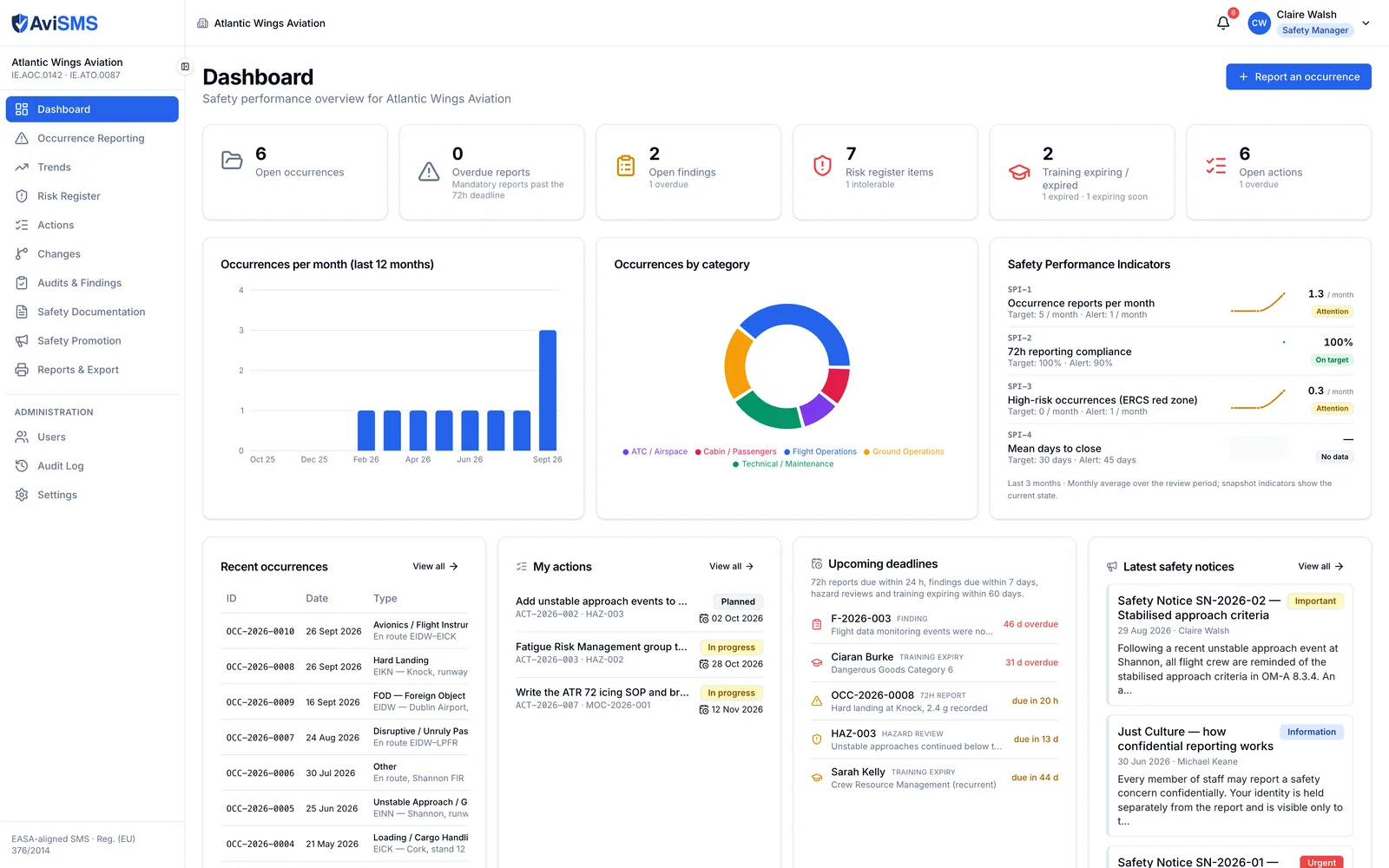
Dashboard
Safety Performance Indicators with targets and alert levels, monthly and category charts, and what is open: overdue reports, analysis dates falling due, findings, actions, training expiring.
Reg. 376/2014 Art. 4
Occurrence reporting
ECCAIRS-aligned form filled from your fleet register and the METAR, ERCS classification, the 72-hour countdown and the Article 13 clocks, a log of every filing to the authority, investigation, confidential reports, E5X and PDF export.
Reg. 376/2014 Art. 13
Trends
Period analysis by category, severity, type, phase and location; 72-hour compliance; open against closed; risk score distribution.
ORO.GEN.200(a)(3)
Risk register
5×5 matrix in your own wording with tolerability thresholds, per-case risk assessments signed by the assessor and the safety manager, residual risk, links to occurrences and changes, and a mitigation library the organisation extends.
ORO.GEN.200(a)(3)
Action tracker
Every mitigation, corrective and preventive action in one list with a named owner, a due date and verification — routed to the right post by area, chased daily, and visible to the person who has to do it.
ICAO Annex 19
Management of change
A change proposed, assessed on the matrix, approved by the Accountable Manager, implemented and reviewed afterwards, with the hazards and actions it raises attached to it.
ORO.GEN.200(a)(6)
Audits and findings
30 checklist templates (7 EASA-aligned, 23 for the Operations Manual), four-state answers with evidence, findings with Level 1, Level 2 and observation deadlines, extensions and verification.
ORO.GEN.200(a)(2), (a)(5)
Safety documentation
A register of 12 document categories — the Operations Manual Parts A to D, the SMS and compliance monitoring manuals, the ERP, the MOE and CAME — with or without the file, and findings and hazards pointing at the section that applies.
ORO.GEN.200(a)(4)
Safety promotion
Notices addressed to the positions they concern, acknowledged and reminded after 7 days, and training records the trainee signs and the Head of Training confirms.
Reports and export
Occurrence, ECCAIRS form, risk assessment, change record, monthly, risk register, audit findings and checklist PDFs; an Excel workbook; the E5X package; fillable forms; a ready-to-paste Operations Manual section.
ORO.GEN.200(a)(1)
Settings
Organisation profile and logo, Accountable Manager change history, the fleet register, users and their posts, action routing, deadlines, risk thresholds and wording, SPI definitions, the mitigation and forms libraries.
An assistant that drafts, and a person who decides.
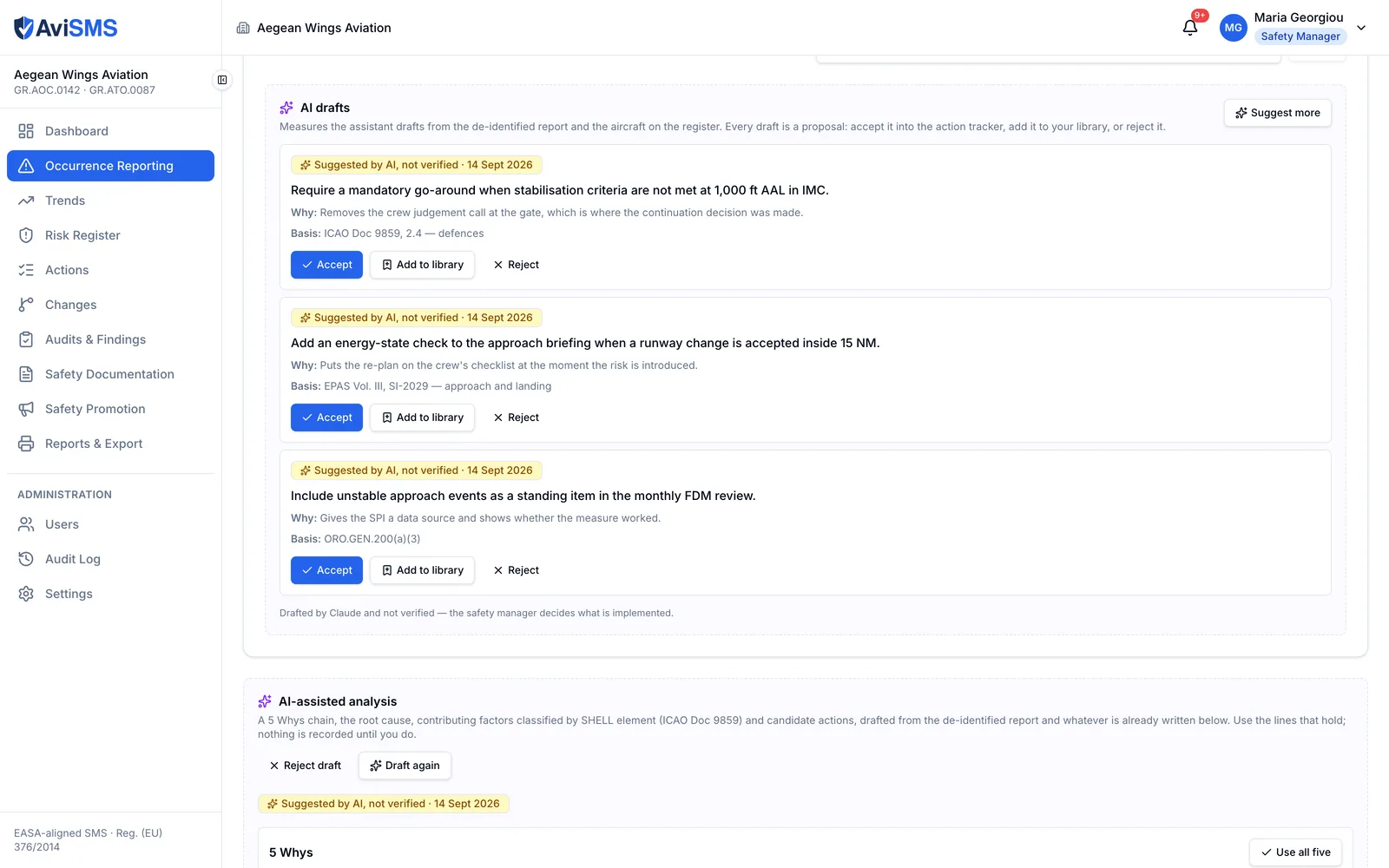
The AI assistant is an optional add-on. It writes the first version — of a set of mitigation measures, of the Five Whys behind an occurrence, of a safety bulletin, of the reference to the paragraph of your own manual that applies — and then waits. Every draft is labelled as one until a named person accepts it, and it files nothing with anybody.
- Measures with a basis
- Mitigations proposed from the occurrence, your fleet and your own library, each with the reason and the reference behind it. Accepted one at a time, each becomes a tracked action with an owner.
- Investigations, started
- A Five Whys chain, a candidate root cause and contributing factors classified against SHELL and the ADREP explanatory factors — the taxonomy the authority already reads.
- Your manuals, cited
- Each revision is indexed once. Ask a finding for references and it answers with the section and page, and opens that page of the PDF so you can check it before accepting it.
- Paper, turned into records
- Upload a filled-in report and it becomes a draft occurrence for review. Upload your company's own form and AviSMS rebuilds it as a fillable PDF, in your layout, that the application then uses everywhere.
For the operators who answer to an authority.
AviSMS is built for organisations whose management system is inspected: the vocabulary, the references and the deadlines are the regulator's.
AOC holders
Commercial air transport operators of aeroplanes and helicopters certified under Regulation (EU) No 965/2012, from a two-aircraft air taxi to a regional fleet. The compliance monitoring checklists follow the Operations Manual structure.
Approved training organisations
Flight schools certified under Part-ORA, which must run the same management system as an operator, proportionate to their size. One safety manager and a handful of reporters is a complete setup.
Both under one certificate holder
An organisation that holds an AOC and an ATO approval runs one AviSMS organisation, with both numbers on the profile and one risk register.
Five roles, and the post beside them
A user belongs to exactly one organisation. The role is a claim on the user's sign-in token, set only by a server-side function, and the security rules enforce it on every read and write. Beside it sits the person's post — Flight Operations Manager, Head of Training, Captain, Cabin Crew — which decides routing rather than access: who is told about a new report, who owns an action, who confirms a training record.
- Administrator
- Everything, including users, invitations and settings.
- Safety manager
- Occurrences (investigate, classify, close), risk register, actions, changes, audits, documents, promotion, reports; settings read-only.
- Auditor
- Audits and findings in full; creates and updates actions but does not verify them; read access elsewhere; no users or settings.
- Reporter
- Files reports; sees their own, broadcast and forwarded occurrences; reads documents and notices; sees and closes the actions assigned to them.
- Viewer
- Read-only across the organisation; no users or settings.
Where your data lives, and who can touch it.
Every design decision below exists so that an auditor's question about your records has a short answer.
Google Cloud, europe-west1 (Belgium)
The database, file storage, authentication and server-side functions are all pinned to one EU region. Nothing is replicated outside it.
One organisation, one boundary
Every record lives under your organisation. The security rules compare the organisation on the user's sign-in token with the path of the record on every read and write, so a query cannot reach another tenant's data.
An audit log users cannot edit
Every write to an occurrence, hazard, audit, finding, notice, document or training record is logged by a server-side trigger. Administrators can read the log; nobody can change it.
Archive, never delete
Occurrences, hazards, audits and findings are archived, not removed, and each carries its full history — who changed what, and when.
Confidential reports stay confidential
When a reporter marks a report confidential, the parent record shows no name. The identity is stored in a restricted sub-record that only the safety manager and administrators can read.
A check every morning
A scheduled function looks every morning for overdue 72-hour reports, analysis deadlines falling due, findings past their date, actions overdue, training about to expire and hazards due for review, and notifies the people responsible.
Every filing to the authority is on the record
Each submission is logged with its channel, its version — initial, preliminary, final or update — the reference the portal returned and the file that was sent, so the question of what you told the authority and when has one answer.
The AI assistant sees no reporter
Where the optional assistant is switched on, names, email addresses and the identity behind a confidential report are stripped before anything leaves the server, and only the fields a feature needs are sent at all. It drafts; it never writes a record, and it never files anything.
Questions safety managers ask first.
- Does AviSMS replace ECCAIRS 2?
- No. ECCAIRS 2 is the European reporting system operated by EASA and the national authorities, and it is where your mandatory reports end up. AviSMS keeps your internal reporting, classification and investigation, and exports each occurrence as an E5X file — the ECCAIRS 2 exchange format — so what you send the authority is exactly what you investigated.
- Is AviSMS approved by EASA or a national authority?
- Software is not approved under these regulations; it is the organisation's management system that the competent authority accepts. AviSMS is built to the structure that Regulation (EU) No 376/2014, ORO.GEN.200 and ORA.GEN.200 describe, using their vocabulary and their deadlines. Verify acceptance with your competent authority as part of your management system documentation.
- How does the 72-hour deadline work?
- The clock starts at the occurrence date and time you enter, not when the report was filed — the conservative reading of Article 4. It turns amber 24 hours before the deadline, the safety manager is notified of overdue reports every morning, and it stops at the first filing to the authority. Article 13(4) then starts two more: the preliminary results and the action to be taken are due in 30 days, the final results in 90, and filing a preliminary or final version stops the matching one.
- What happens to the actions a report produces?
- They go into one tracker, whatever raised them — a hazard, an occurrence, a finding, a risk assessment or a change. Each has a named owner with their post, a due date and a status that ends in verification by the safety manager, and the person it belongs to sees it whatever their role: a pilot with a reporter account sees and closes their own action without seeing anyone else's report. An occurrence with an open action does not pass the closing gate.
- Is there AI in it, and what does it do?
- There is, as an optional add-on, and it drafts. Mitigation measures with the basis each rests on, the Five Whys and contributing factors of an investigation, a safety bulletin for the safety manager to approve, the section and page of your own manual that applies, and a draft occurrence read out of a form somebody filled in on paper. Every draft is labelled as unverified until a named person accepts it; it classifies nothing, closes nothing and files nothing with an authority. Reports are de-identified before anything is sent. How the AI assistant works
- What happens to a confidential report?
- A reporter can mark any report confidential. The record everyone else sees carries no reporter name or email; the identity lives in a restricted sub-record readable only by the safety manager and administrators. Reporters see their own reports, broadcast reports, and reports forwarded to them — nothing else.
- Can a small ATO run it?
- Yes. ORO.GEN.200(b) and ORA.GEN.200(b) ask for a management system proportionate to the size and complexity of the organisation. A two-aircraft school runs occurrence reporting, a risk register and its audit checklist with one safety manager and its instructors as reporters, and switches the rest on when it needs it.
- Where is the data stored?
- On Google Cloud in europe-west1 (Belgium). Each organisation's data lives under its own path and is isolated by security rules; the audit log is written only by server-side functions.
- How do we start?
- Create your organisation at app.avisms.aero, which makes you its first administrator. Invite colleagues from Settings — each invitation is a link valid for seven days — and set your competent authority, your reporting deadlines and your risk thresholds. There is nothing to install.
- What does it cost?
- €1,800 a year for an AOC holder with one or two aircraft, €1,188 for a training organisation with one or two, €3,000 for a Part-145, Part-CAMO, aerodrome or ANSP organisation up to 25 staff. It is a flat annual fee for the organisation: every module, and unlimited users in every role, with no per-seat charge. The larger bands, storage, onboarding and group terms are all published. 60 days to try it first, and an invoice rather than a card. The full price list
Start with your organisation.
Create it in a minute, invite your safety manager, file the first report. Your competent authority, deadlines and risk thresholds are all settings — and the defaults are the regulation's.